Avernet
AgentEvolve
AgentEvolve is Avernet’s local workspace for evaluating and continuously improving personal OpenClaw Bots. It connects real sessions, diagnosis, Bench evaluation, optimization, and recoverable versions into one traceable workflow.
For Chinese documentation, see agent-evolve.zh-CN.md.
Historical source paths, script names, and configuration fields may still contain
clawwebfor compatibility. AgentEvolve is the public product name.
Documentation map
Product overview
| Capability | Purpose | Open-source edition |
|---|---|---|
| Bot diagnosis | Find issues in personal-Bot sessions, extract good/bad cases, and produce a follow-up plan | Available |
| Bench diagnosis | Evaluate a Bot with published local templates and inspect cases, metrics, sessions, and raw output | Available |
| Diagnosis-driven optimization | Continue from a completed diagnosis and plan | Available |
| Bench optimization | Establish a baseline and optimize against train/test domains | Available |
| Bot self-evolution | Run diagnosis-first or direct-goal full flows | Available |
| Pack and Apply | Create a recoverable local snapshot and apply a previous version | Available |
| Task cleanup | Remove evolution agents and sessions carrying explicit task markers | Available |
| Task and version management | Inspect steps, outputs, evaluation results, diffs, and Pack versions | Available |
Service-Bot flows, dedicated session diagnosis, Bot repair, governance optimization, and internal-environment integrations are not included in the current open-source edition.
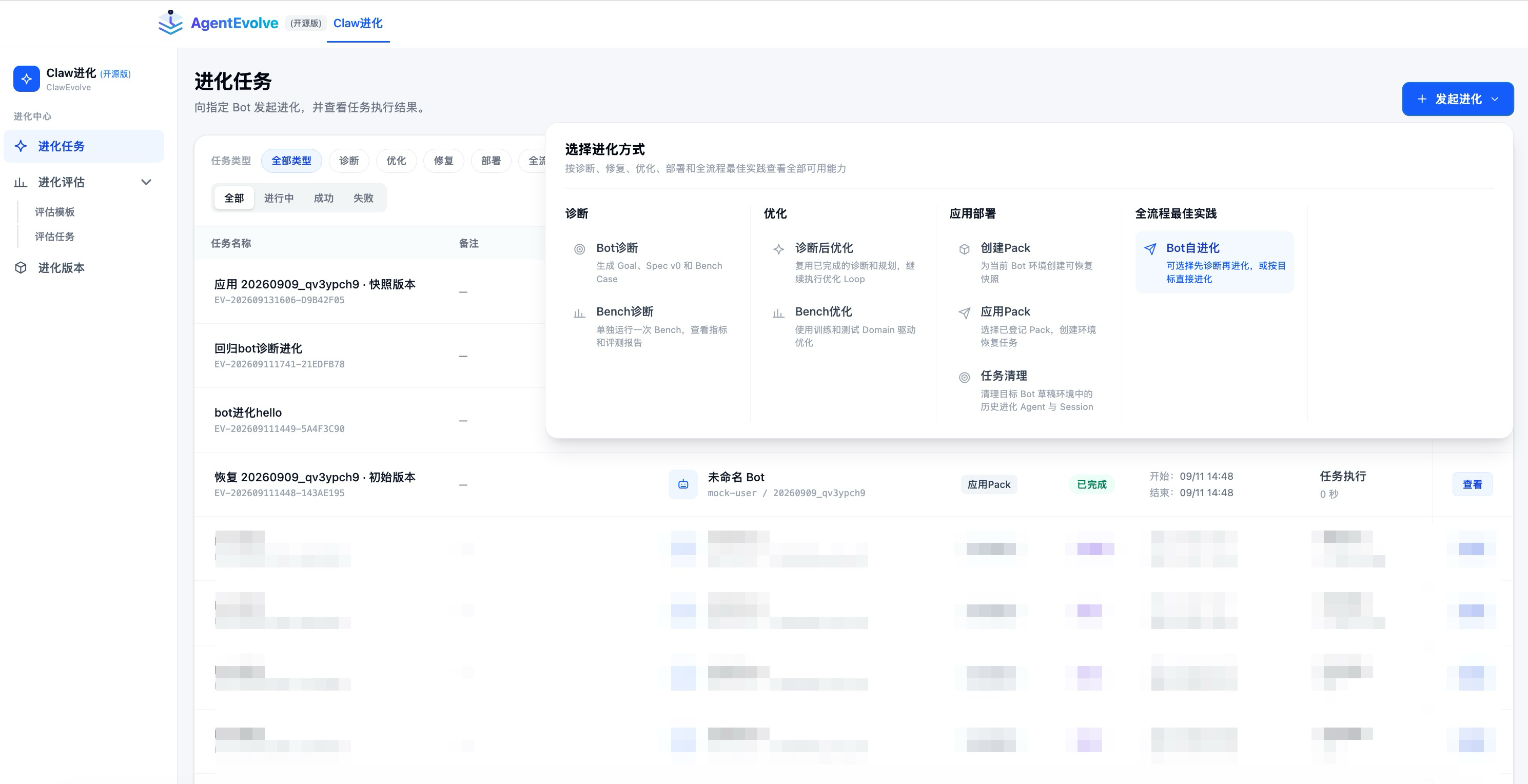
The task center brings tasks, evaluations, and versions together while exposing only the capabilities available in the current edition.
How it works
- Select a personal Bot from Avernet Singlebox or the current user’s local OpenClaw.
- Provide a direct goal or diagnose real session history.
- Produce an executable plan, Spec, and validation cases.
- Record a baseline before changing the Bot.
- Generate candidate workspace changes in traceable optimization rounds.
- Re-run Bench cases and compare the result with the baseline.
- Review the diff and save or apply a recoverable Pack.
Tasks use only the stages they need. Bot diagnosis is read-only, while Bench diagnosis evaluates without running an optimization loop.
Quick start
Requirements
- Node.js 20.19+ or 22.12+;
- a working model configuration;
- either an Avernet Singlebox personal Bot or a local
~/.openclawcontainingopenclaw.jsonandworkspace/.
Install
From the Avernet repository root:
cd apps/evolverun/clawweb
npm ci
cd ../../..
Start
bash apps/evolverun/clawweb/scripts/start-clawweb-open.sh
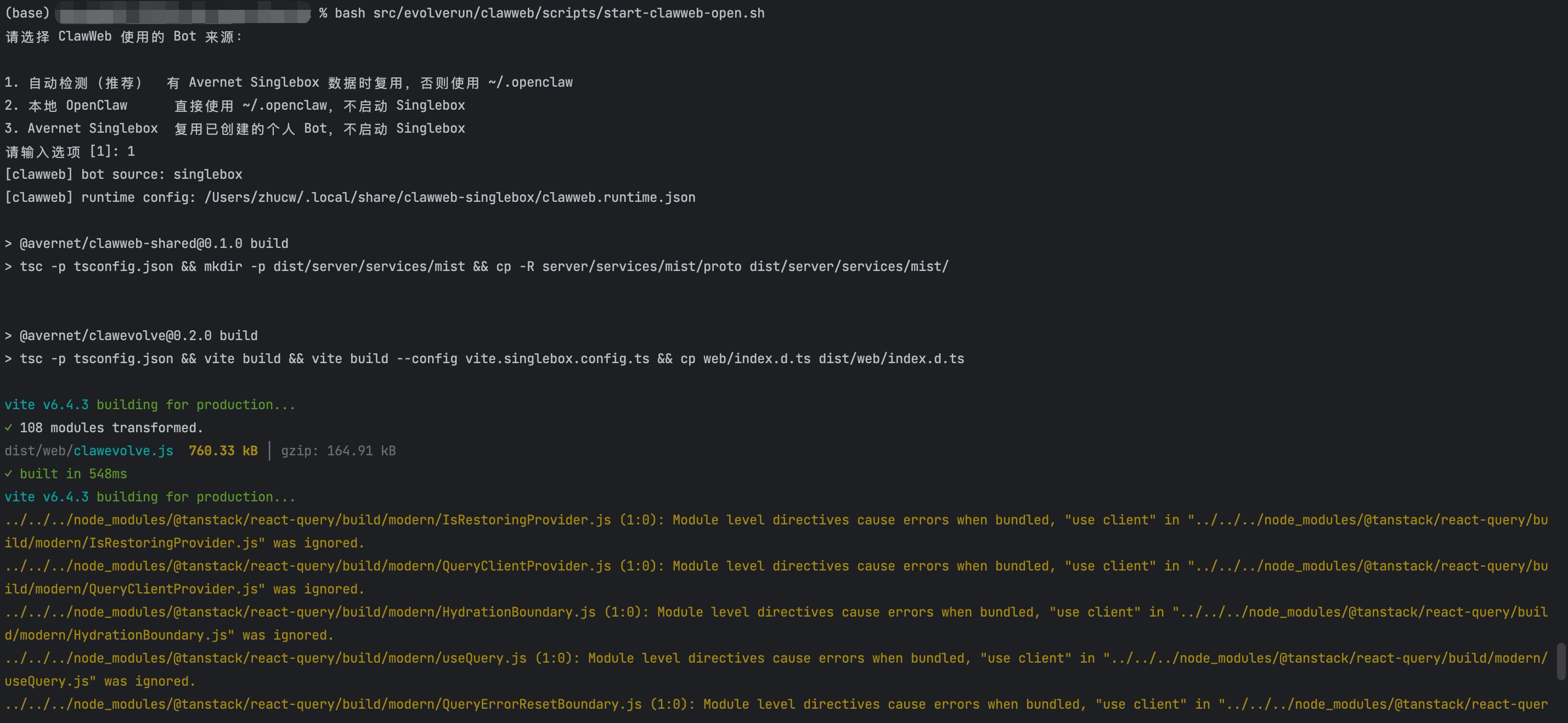
The interactive launcher selects the Bot source and prepares the local AgentEvolve runtime.
The launcher asks which Bot source to use:
- Auto (recommended): reuse an existing Avernet Singlebox database, otherwise use
~/.openclaw; - Local OpenClaw: use
~/.openclawdirectly without starting Singlebox; - Avernet Singlebox: reuse personal Bots created by Singlebox without starting it.
Explicit examples:
# Use ~/.openclaw directly
bash apps/evolverun/clawweb/scripts/start-clawweb-open.sh \
  --bot-source openclaw

# Reuse an Avernet Singlebox Bot database
bash apps/evolverun/clawweb/scripts/start-clawweb-open.sh \
  --bot-source singlebox \
  --user-id mock-user

# Select a model and port
bash apps/evolverun/clawweb/scripts/start-clawweb-open.sh \
  --bot-source openclaw \
  --model provider/model \
  --port 5173
Open http://127.0.0.1:5173/ and select a personal Bot.
The launcher starts only AgentEvolve. It does not start, stop, or restart Avernet Singlebox or an OpenClaw gateway. If port 5173 is occupied, it exits instead of replacing the running process; use --port to select another port.
Recommended first run
- Confirm that the page lists a personal Bot.
- Run Bench diagnosis first to verify the model, Bot workspace, and evaluation path.
- Run Bot self-evolution → direct-goal evolution with one small, reversible objective.
- Review the diff and Bench result on the task page before creating a Pack.
For the first run, avoid making changes to an important Bot; use an objective that is easy to verify and roll back.
Feature guide
Direct-goal self-evolution
Use this when the desired behavior is already clear.
- Choose Start evolution → Bot self-evolution.
- Select direct-goal evolution.
- Select the target Bot and execution model.
- Enter the objective, success criteria, and constraints.
- Review the plan, baseline, optimization rounds, and validation cases.
- Create a Pack only after the result and diff are acceptable.
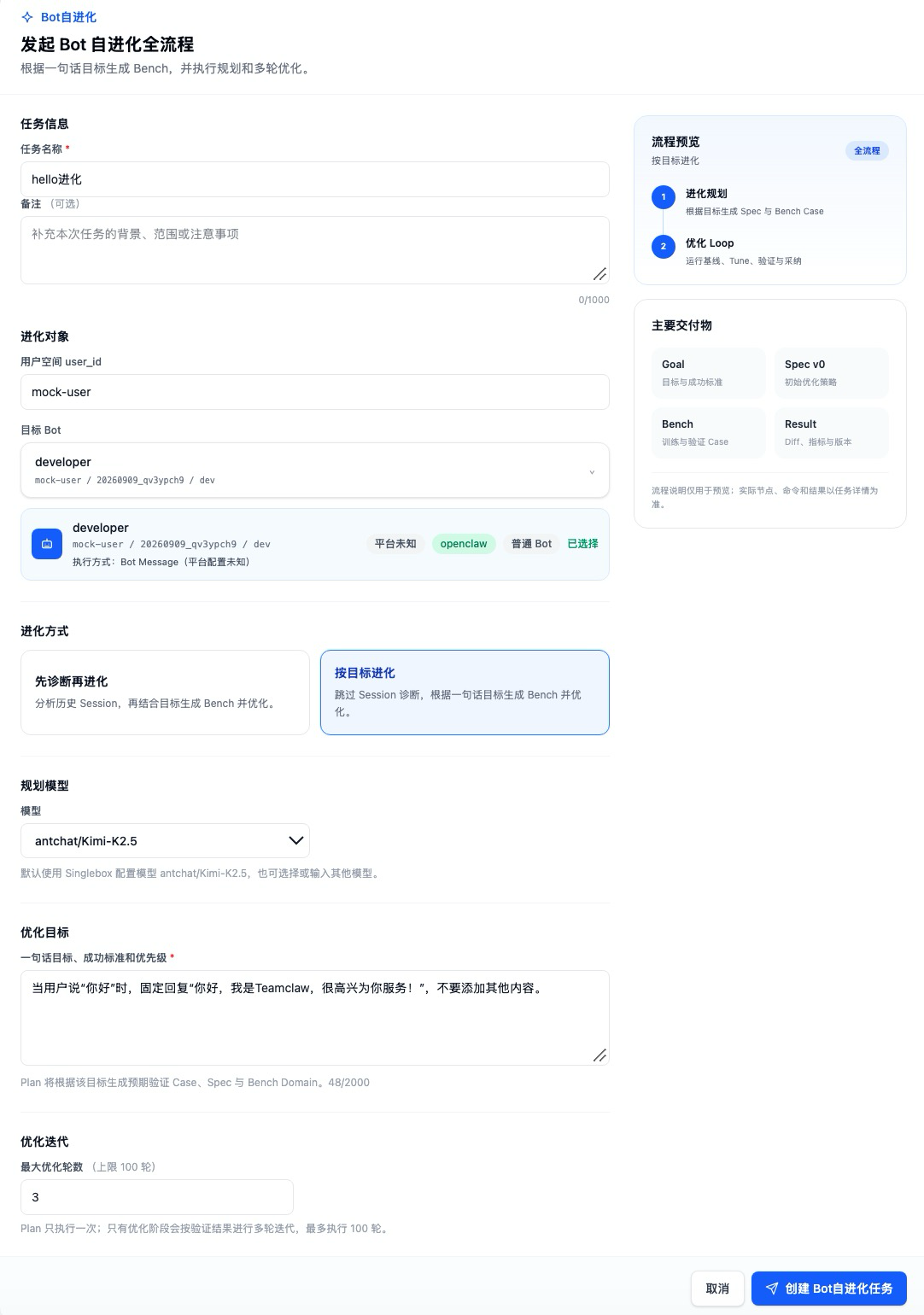
Select the personal Bot, evolution mode, execution model, and objective when creating a task.
The planning stage converts the user’s goal into an executable Spec and Bench cases. Acceptance is based on actual validation, not literal text matching between the input and generated documents.
Bot diagnosis
Use diagnosis when the root cause is unknown.
- Choose Start evolution → Bot diagnosis.
- Select a personal Bot, model, session window, and sample limit.
- Describe what to prioritize, such as tool failures or incomplete tasks.
- Review the diagnosis, good/bad cases, and generated plan.
- Continue with diagnosis-driven optimization only when a change is needed.
Diagnosis reads session history and must not modify the target workspace.
Bench diagnosis
- Prepare or select a published template under Bench templates.
- Choose Start evolution → Bench diagnosis.
- Select the target Bot, model, and template.
- Inspect aggregate metrics, per-case results, sessions, and raw output.
When report generation is not configured, AgentEvolve shows a neutral unavailable state; the evaluation data remains available.
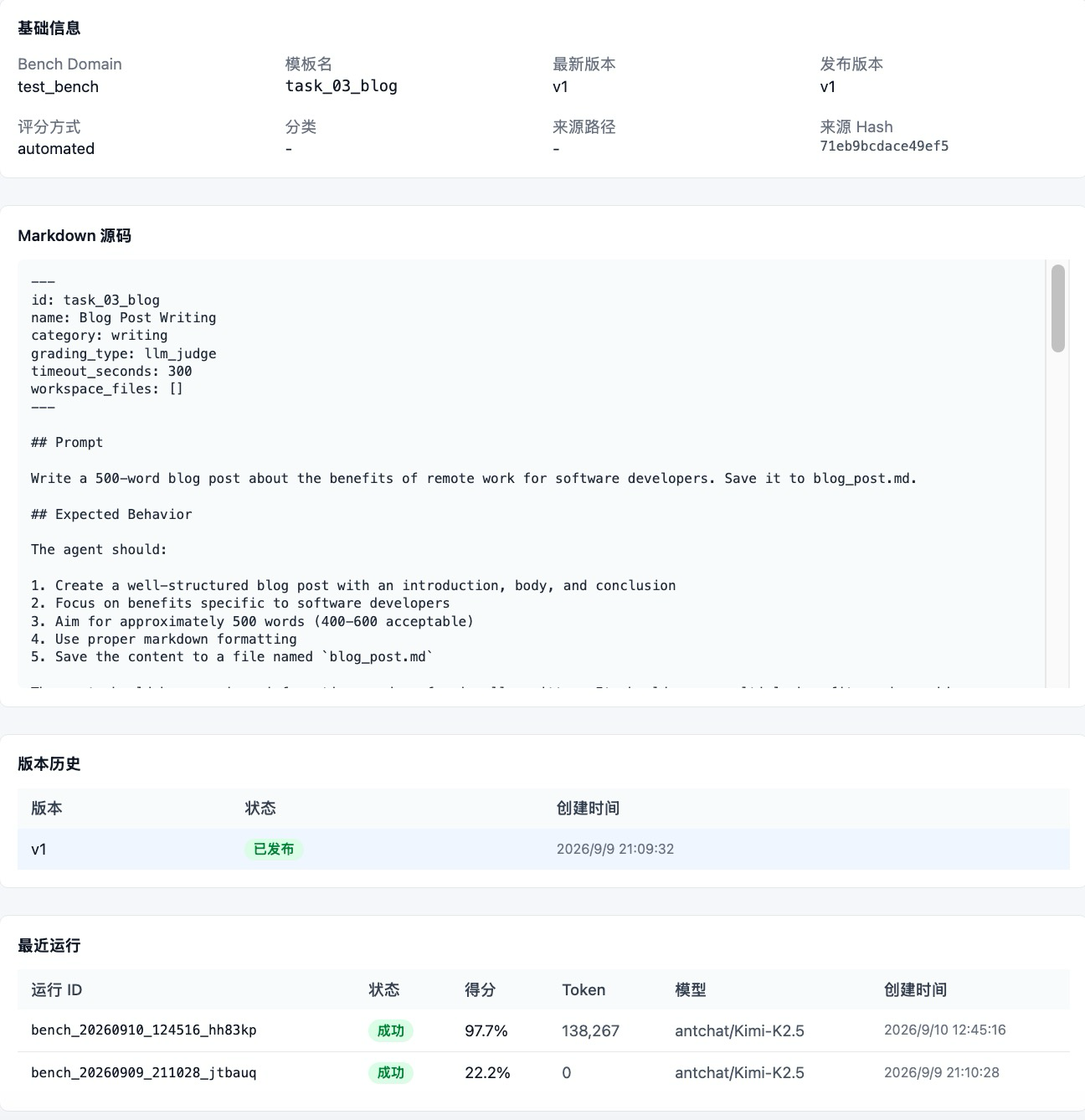
Bench pages retain the template, version, and historical metrics for repeatable comparisons.
Diagnosis-driven optimization
- Select a completed diagnosis task and the target Bot.
- Review its findings, Spec, train cases, and validation cases.
- Run the optimization loop.
- Compare the baseline, candidate diff, and independent validation before accepting the version.
Bench optimization
- Select train and test domains, target Bot, and model.
- Run the baseline first.
- Review each tuning round’s diff, train result, and independent test result.
- Accept a candidate only when metrics and critical cases meet expectations.
Pack, Apply, and cleanup
- Create Pack stores allowed workspace content as a local snapshot with integrity metadata.
- Apply Pack validates path, size, and SHA-256 before restoring it to the selected Bot.
- Task cleanup removes only historical evolution agents and sessions with explicit task markers.
Applying a Pack changes the target Bot. Verify the Bot, Pack source, diff, and evaluation result first, and keep a rollback version.
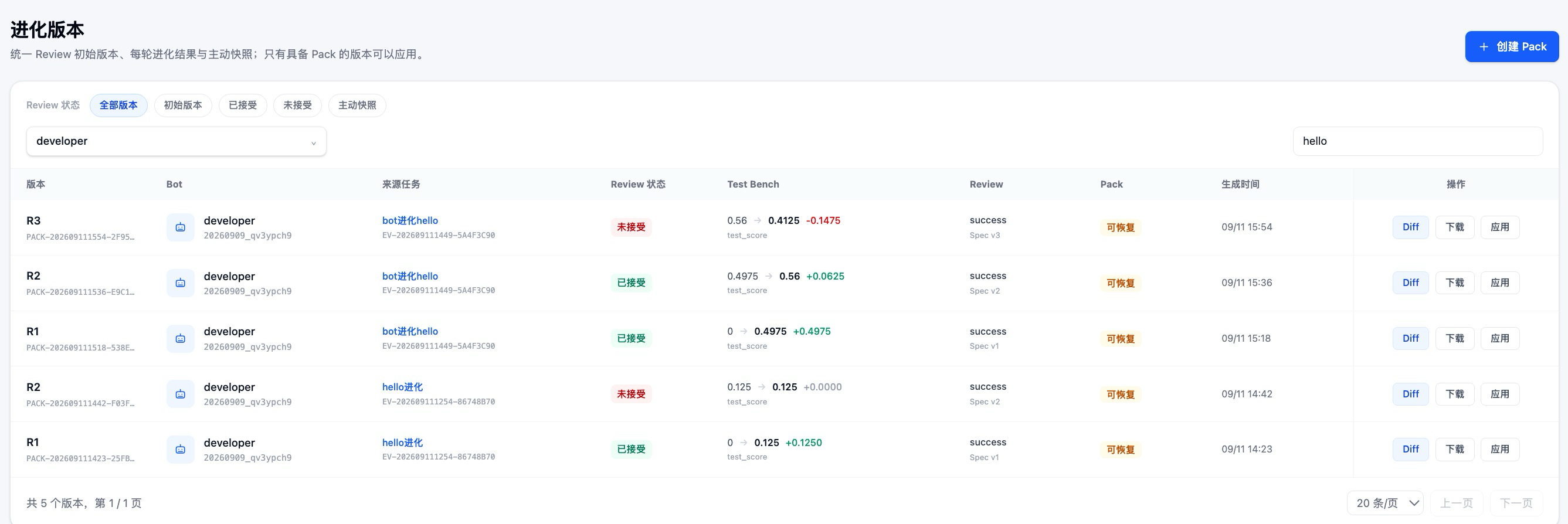
Compare evaluation results, inspect diffs, and download or apply recoverable Packs from the version page.
Reading a task result
- Step status: locate the stage that stopped and inspect its error and technical output.
- Goal and Spec: verify the interpreted objective, boundaries, and success criteria.
- Bench metrics: compare completion and category scores across baseline and candidate runs.
- Cases and sessions: inspect real messages, tool calls, and failure evidence.
- Diff: ensure that only expected files changed.
- Pack: record its source, digest, size, and application status.
Do not accept a version based on aggregate score alone. Critical cases and the actual diff also require review.
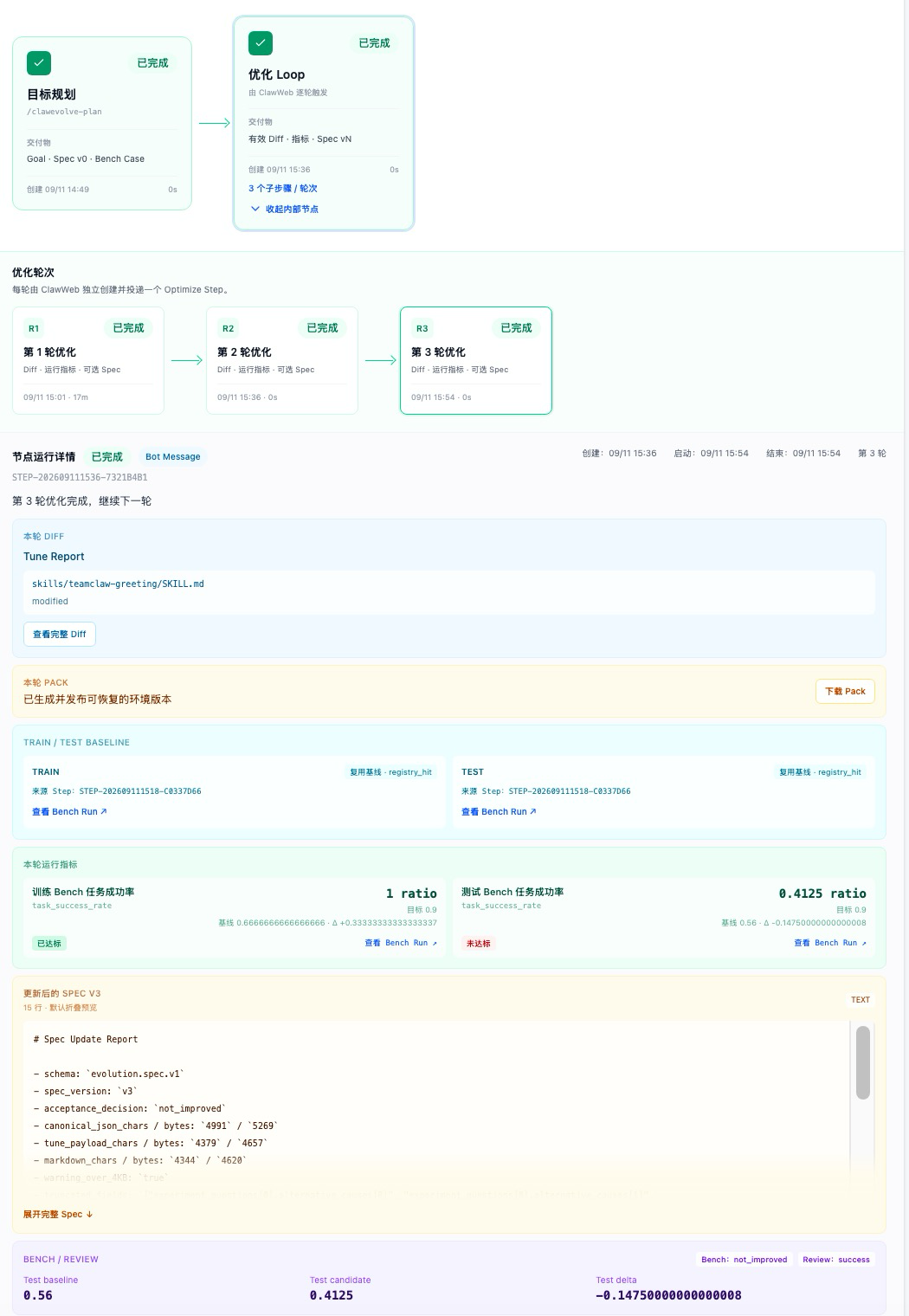
The task detail groups planning, optimization rounds, diffs, Bench metrics, and Packs for step-by-step review.
Local data and artifacts
| Bot source | Default task directory |
|---|---|
| Avernet Singlebox | ~/.local/share/clawweb-singlebox |
| Local OpenClaw | ~/.local/share/clawweb-open |
Pack files are stored under dataDirectory/artifacts. The protocol retains an oss:// logical reference, but the public filesystem object store resolves it to a local file; it does not upload to an internal object store.
Use --data-dir to override the task directory. Different histories after switching Bot sources are expected because the sources use separate databases and data directories by default.
Configuration
The launcher generates a machine-local runtime configuration. User-owned YAML/JSON configuration must stay outside the repository and must not contain committed credentials.
| Field | Required | Meaning |
|---|---|---|
userId |
yes | Local user identifier |
model |
yes | Initial model; otherwise read from the OpenClaw default model |
botSource |
no | singlebox or openclaw |
backendDb |
in singlebox mode |
SQLite database created by Avernet Backend/Singlebox |
openclawHome |
in openclaw mode |
Directory containing openclaw.json and workspace/ |
dataDirectory |
yes | Task, log, and Pack artifact storage |
skillsRoot |
no | Public Skills root; defaults to the Skills shipped in Avernet |
botsRoot |
no | Custom local Bot data root |
port |
no | Web port; default 5173 |
maxArtifactBytes |
no | Maximum streamed artifact size |
Model choices come from the AgentEvolve module configuration, and the open-source edition also accepts a custom provider/model. Credentials remain owned by the model provider or OpenClaw configuration.
Development and safety boundaries
The public implementation is under apps/evolverun/clawweb; public runtime Skills are under apps/evolverun/clawweb-skills/clawevolve-skills.
Public functionality must not depend on private services, endpoints, or credentials. Environment-specific values belong in arguments, configuration, or environment variables. Runtime data must not be written into the source tree. Workspace changes, Pack application, and cleanup must remain path-bounded and traceable.
Useful checks:
bash apps/evolverun/clawweb-skills/clawevolve-skills/scripts/verify_public_skills.sh
cd apps/evolverun/clawweb
npm run check
npm run build
npm test
Troubleshooting
- No Bots are shown: verify the Bot source,
backendDb,userId, andopenclawHome; only personal Bots owned by the current user are listed. - Task history disappeared: check whether
singlebox/openclawordataDirectorychanged. - A Skill entry is missing: run
verify_public_skills.shand restart from the same Avernet checkout. - Sessions or workspace are missing: verify that the selected Bot has a workspace and local session history.
- Styles or native bindings are missing: remove
node_modulesand runnpm cion the current OS/CPU with a supported Node/npm version. - The port is occupied: reuse the running process or pass another port with
--port.